
Keep Trello when the team needs to see which card is ready and who moves it next. Choose Asana Starter if the project needs a schedule with linked dependencies. Choose Asana Advanced when you need to balance effort across projects in one portfolio. A card in Review can tell an editor to act today. A dependency tells the team which date moves when the review slips.
Start with how work changes hands
Trello puts boards, lists and cards at the center of the work. For an example editorial board, lists might be Ready, Writing, Review and Published; moving a card changes its stage. Asana also has a board view, including on Personal, alongside list and calendar views. Both tools can show columns, so ask whether columns answer the question your team keeps asking.
For a small stream of requests, a card in Review gives an editor a clear next move. When copy, design and review lead into the same launch date, write down one dependency. For example, Final copy can go live only after the editor approves it.
In a published G2 comparison, a reviewer built a small research-to-publication workflow in both tools. Trello was quicker for initial setup in that walkthrough. Asana offered more structure once configured. Zapier's comparison similarly found more built-in project configuration in Asana and more ways to extend Trello with Power-Ups. For a simple queue, make the handoff as clear as the Trello test. For a schedule, use the missed approval to find out whether those extra project controls earn their keep.
Match Timeline, reporting and workload to the right plan
Trello Premium includes Timeline and Dashboard. Use those to read a schedule or see the distribution of cards. Asana Starter includes Timeline, Gantt and reporting dashboards. Compare the kind of decision you need to make in the view you plan to buy.
| Need | Trello | Asana |
|---|---|---|
| A free shared board | Free: up to 10 collaborators and 10 boards per Workspace. | Personal: two users, with list, board and calendar views. |
| Schedules and dependencies | Premium or Enterprise: Timeline groups cards by list, member or label. Dependency relationships need a configured method. | Starter: Timeline and Gantt; Timeline can show task dependencies and milestones. |
| Reporting | Dashboard on Premium and Enterprise. | Reporting dashboards on Starter; portfolios on Advanced. |
| People's capacity across projects | Premium Timeline can group scheduled cards by member so you can inspect overlapping dates. | Advanced: resource management within one portfolio. Enterprise adds organization-wide workload and capacity planning. |
In Trello's Timeline view, card date ranges and grouping help you see a schedule by list, member or label. The view is available on web and desktop, on Premium and Enterprise; it isn't available in the mobile apps. A crowded row is a reason to ask about effort and doesn't prove that a person is over capacity.
Trello's own dependency guidance says it has no built-in task dependency management. It describes linked checklist items and configured Automation rules, including rules that move related cards or shift dates. Asana's Timeline connects tasks with owners, dates, milestones and dependencies. For a launch where approval blocks publication, I'd choose Asana Starter rather than maintain a network of linked cards and rules.
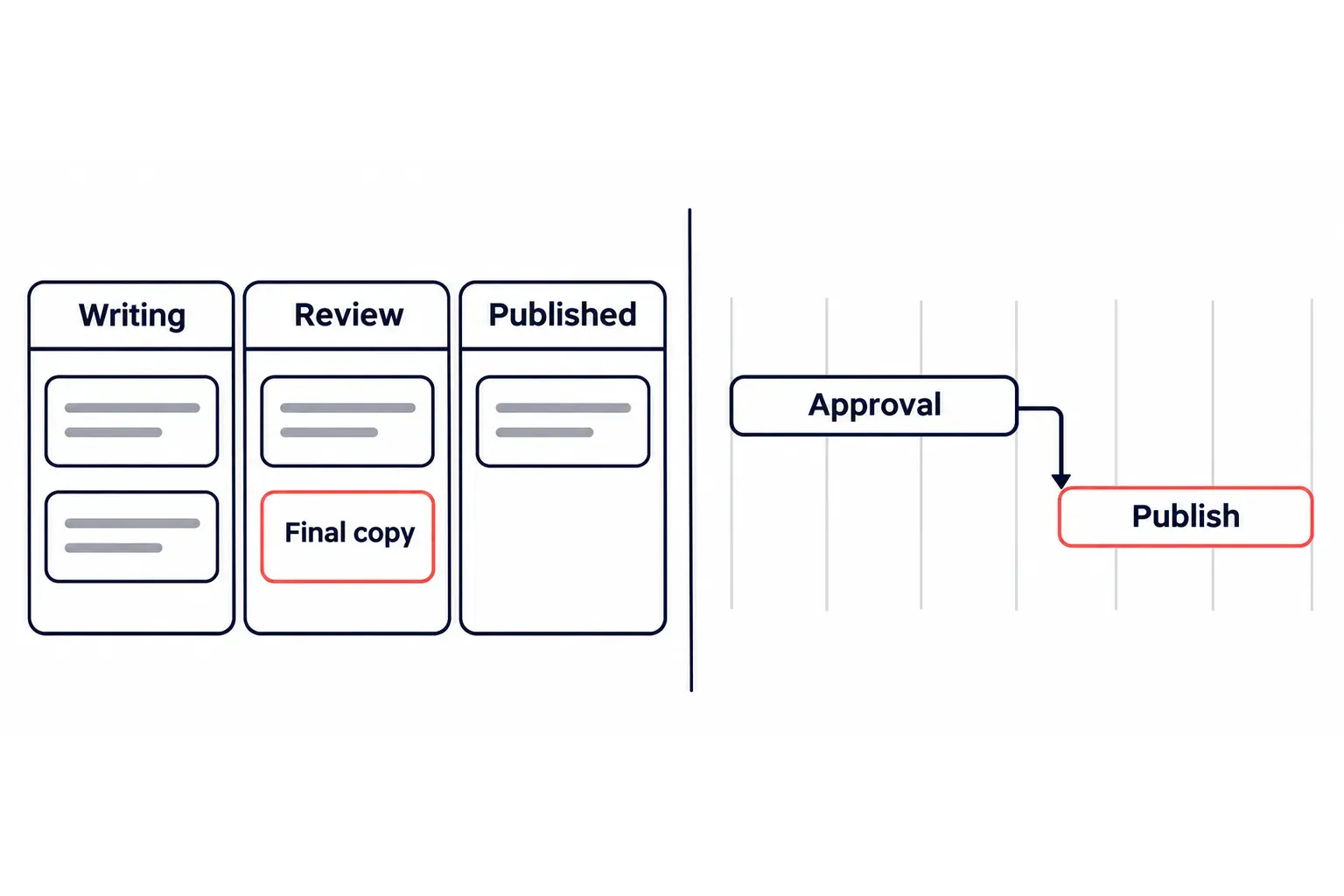
Workload is a different purchase. Asana can sum task effort in hours or points against each person's weekly capacity. Advanced covers resource balancing within one portfolio; organization-wide resource management and capacity planning sit on Enterprise. Those totals need owners, dates and effort estimates. If your team won't maintain those fields, an overload chart won't become reliable just because you've bought it.

Compare the free limits before the paid prices
The table uses US-dollar list prices from Trello and Asana. Paid amounts are per user per month; the billed-annually rate is a monthly equivalent tied to an annual subscription. Confirm the currency and billable-seat count in your checkout before choosing a budget.
| Plan | Billing rates and reason to consider it |
|---|---|
| Trello Free | $0. Up to 10 collaborators and 10 boards per Workspace. |
| Asana Personal | $0. Two users; unlimited tasks and projects. |
| Trello Standard | $5 per user/month billed annually, $6 billed monthly. Unlimited boards and Custom Fields. |
| Trello Premium | $10 per user/month billed annually, $12.50 billed monthly. Timeline and Dashboard views. |
| Asana Starter | $10.99 per user/month billed annually, $13.49 billed monthly. Timeline, Gantt and reporting dashboards. |
| Asana Advanced | $24.99 per user/month billed annually, $30.49 billed monthly. Portfolios and resource management within one portfolio. |
For a team of three to ten people whose work fits within ten boards, Trello Free is the starting point I'd choose: its collaborator allowance covers that example, while Asana Personal stops at two users. For one or two people who want list and board views across many projects, Personal deserves a look. Unlimited tasks and projects don't remove its two-user limit.
Asana's seat FAQ lists single-seat additions between two and five users, then blocks of five up to 30, with larger increments beyond that. For five paid users at the annual USD list rates, that's $659.40 for a year of Asana Starter or $600 for Trello Premium before tax. A sixth Asana user takes the ten-seat tier under the published increments. At the same annual rates, that is $1,318.80 for Asana Starter and $720 for six Trello Premium seats before tax. Confirm the actual seat count at checkout and include the cost of any third-party connector your workflow requires.
Choose automation by the move it saves
Trello Free includes 250 Workspace command runs per month. Standard includes 1,000, and Premium lists unlimited command runs, with operations capped at 150,000 plus 10,000 per user, up to 250,000 per Workspace a month, in Atlassian's quota table. Start with a concrete move, such as moving a finished card into Review, then estimate how often the rule will run. The allowance is for the Workspace; don't read 250 as a separate budget for every board.
Asana lists unlimited automations on Starter. That helps if the paid project already meets your scheduling needs, but a larger allowance doesn't prove that the rule you need exists. Before switching, write the intended trigger and action in plain words and check both products' controls against it. Keep the decision tied to a recurring handoff, rather than buying automation for a board whose next move nobody has agreed.
AI is tiered too: Asana Starter includes AI Teammates and Asana Dash with 5 requests per user per month, up to 50 per account, while Trello lists its AI features from Standard up, so price the AI your team would use.
Move a sample project before committing the whole board
For a one-time move, export the original Trello board as CSV from a Premium or Enterprise Workspace. On Free or Standard, export JSON and use the spreadsheet conversion in the same guide to make a CSV. Keep a working copy with two rows that form a real handoff, such as Approve final copy and Publish the page. Keep the original board available for comments and files.
Open a sample project and follow Asana's CSV import steps. Put Name first in the CSV. Map task names, dates and assignees in the preview. After import, open Publish the page, select Add dependencies and choose Approve final copy. Check that the publishing task shows the earlier task under Blocked by. Attach the needed file or link to its original location, then ask the assignee to open it from their account.

For an ongoing connection, Asana's Trello integration listing points to Unito, a separately paid connector. It supports one-way or two-way syncing, field mapping and a choice about historical or new items. Each of those settings needs a check, because the sync won't turn every part of a Trello board into an equivalent Asana project.
- Choose a small project that contains the fields you need, such as titles, owners, descriptions and due dates. In Unito's Trello field map, check support and sync direction for each field before connecting the wider board.
- Decide how attachments should travel. Unito distinguishes copying the file to a mapped attachment field from streaming a link into the other tool's description footer. Verify which result the destination contains and who can open it.
- Test the documented Trello sync limits: copied checklists aren't supported, cover updates don't sync, and most Power-Up information doesn't travel. Checklist assignees and due dates need equivalent fields in the destination. New comments sync; edits to existing comments don't.
- Compare the sample in both tools with someone who owns the work. Check the owner, dates, attachment access and comments, then decide where future edits belong. Keep the original board available until the destination holds the information the team needs.
Budget for the connection separately. Unito counts synced items in both connected tools and directs buyers to an in-app price or quote. A subscription to Trello or Asana doesn't settle that bill.
Check the handoff before switching
Give the reviewer one active handoff before you pay. Ask them to show what is ready, what approval blocks the next date and who owns it. Switch if your current board leaves that question unresolved and the imported sample answers it. If the board is enough, use the Trello scheduling guide to check what you can do with the plan you have.